Client mapping

Turn client records into a business structure diagram

Build a business structure diagram from the client records you already keep, and it stays accurate as the group changes. Edits in the diagram update the client, and a proposed structure never touches live data until you accept it.

Included in the base subscription

DA & MR Schurr Family Group(Current)effective as of 30/06/2026As at 30th June 2026
Schurr Pty Ltd
Type:
Company
Director:
Schurr, Dean
Secretary:
Schurr, Dean
Shareholder:
Schurr Family Trust [1000]
Operating Company
Schurr Super Fund Pty Ltd
Type:
Trustee Company
Director:
Schurr, Dean
Secretary:
Schurr, Dean
Shareholder:
Schurr, Dean [1]
Schurr, Melissa [1]
Corporate Trustee for the Superfund
Schurr Family Trust
Type:
Trust - Discretionary
Appointor:
Schurr, Dean
Beneficiary:
Schurr, Dean
Schurr, Melissa
Trustee:
Schurr, Dean
Investment Trust
Schurr Superfund
Type:
Self Managed Superannuation Fund
Member:
Schurr, Dean
Schurr, Melissa
Trustee:
Schurr Super Fund Pty Ltd
Self Managed Super Fund for long term investments
Individuals
Schurr, Dean
Schurr, Georgie
Schurr, Isla
Schurr, Melissa
 

Illustrative view. Sample client group.

What goes wrong today

  • The structure lives in someone’s head

    Knowing one company is not the same as understanding the group. A new team member needs to see how the people, companies and trusts fit together.

  • The diagram is separate from the client record

    When details change, a standalone diagram is another document to remember to update.

  • Boxes and lines don’t explain the money

    A structure chart shows who owns what. It doesn’t show the client where the dividends, distributions and rent actually go.

Inside the client map

A diagram that keeps up with the client

Clients forget how their structures work, new team members need to see the order to do the work in, and lawyers need the whole group for estate planning. Every one of those needs a diagram that’s right today. This is a sample view, not a live client group.

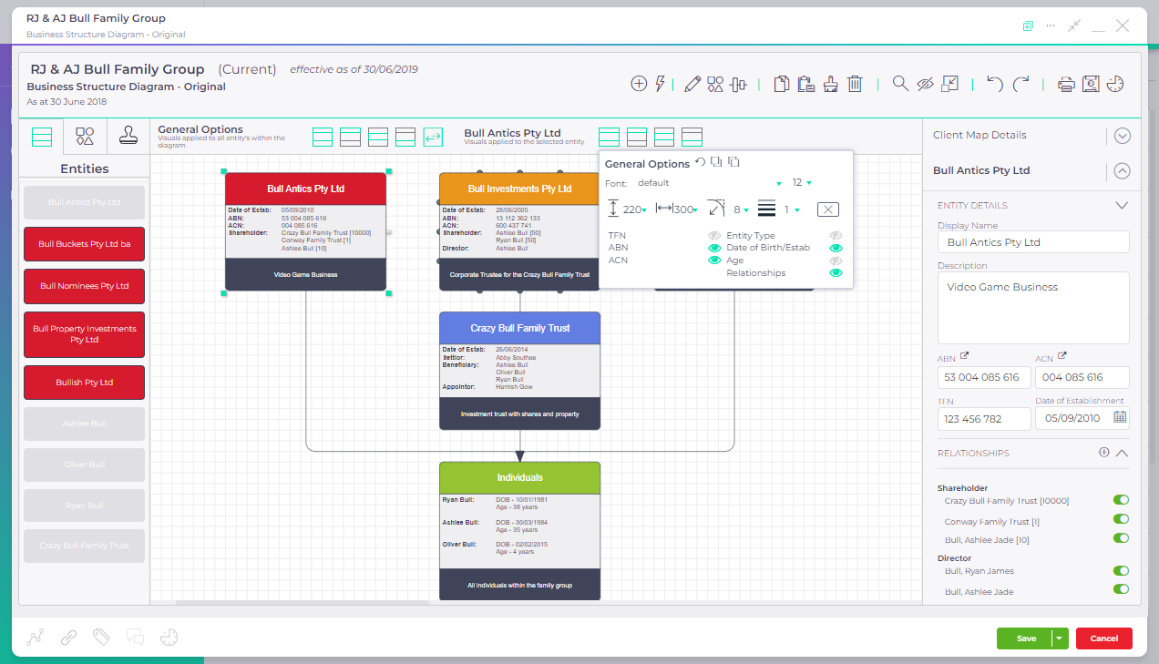
Build the diagram from the clients you already have

Start a current map for the group and its entities are already there, coloured by type in colours you can change, with the relationships from each client record. Add anyone who isn’t a client, like the children here, then let Auto Build lay it all out. Press Build whole diagram to try it.

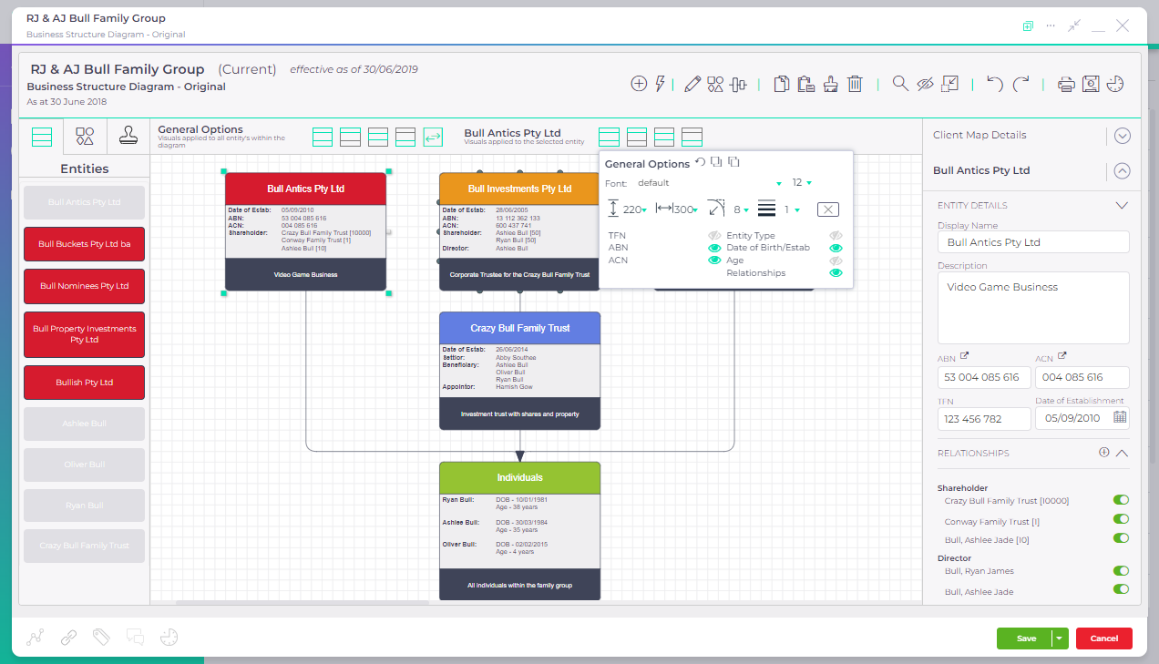
Check each entity and its relationships

Select an entity to see its directors, shareholders, trustees and beneficiaries, and choose which ones show on the diagram. On a current map, an edit here updates the client record, so the diagram and the client list never disagree. Click another entity to see it.

Show how money moves through the group

A structure shows who owns what. Add the flows and it shows how the group works: dividends from the company to the family trust, distributions on to the family, and rent from the company to the super fund for the business premises.

Send it out with the financials

Export the diagram as a PDF or image, in colour or black and white, to your computer or straight to the client’s folder in your DMS. It goes with the financials as a reminder, to the lawyer for estate planning, or to the team member picking up the tax work.

  • Build the diagram from the clients you already have
  • Check each entity and its relationships
  • Show how money moves through the group
  • Send it out with the financials

Build the diagram from the clients you already have

Start a current map for the group and its entities are already there, coloured by type in colours you can change, with the relationships from each client record. Add anyone who isn’t a client, like the children here, then let Auto Build lay it all out. Press Build whole diagram to try it.

DA & MR Schurr Family Group(Current)effective as of 30/06/2026As at 30th June 2026

Drag entities onto the canvas, or use Auto Build

Auto BuildOptionsGroup individuals Reverse order Build Add relationship lines Layout entities

Illustrative AccountKit Client Map. Sample client group and sample details, not live client records.

Check each entity and its relationships

Select an entity to see its directors, shareholders, trustees and beneficiaries, and choose which ones show on the diagram. On a current map, an edit here updates the client record, so the diagram and the client list never disagree. Click another entity to see it.

DA & MR Schurr Family Group(Current)effective as of 30/06/2026As at 30th June 2026

Illustrative AccountKit Client Map. Sample client group and sample details, not live client records.

Show how money moves through the group

A structure shows who owns what. Add the flows and it shows how the group works: dividends from the company to the family trust, distributions on to the family, and rent from the company to the super fund for the business premises.

DA & MR Schurr Family Group(Current)effective as of 30/06/2026As at 30th June 2026
Schurr Pty Ltd
Type:
Company
Director:
Schurr, Dean
Secretary:
Schurr, Dean
Shareholder:
Schurr Family Trust [1000]
Operating Company
Schurr Super Fund Pty Ltd
Type:
Trustee Company
Director:
Schurr, Dean
Secretary:
Schurr, Dean
Shareholder:
Schurr, Dean [1]
Schurr, Melissa [1]
Corporate Trustee for the Superfund
Schurr Family Trust
Type:
Trust - Discretionary
Appointor:
Schurr, Dean
Beneficiary:
Schurr, Dean
Schurr, Melissa
Trustee:
Schurr, Dean
Investment Trust
Schurr Superfund
Type:
Self Managed Superannuation Fund
Member:
Schurr, Dean
Schurr, Melissa
Trustee:
Schurr Super Fund Pty Ltd
Self Managed Super Fund for long term investments
Individuals
Schurr, Dean
Schurr, Georgie
Schurr, Isla
Schurr, Melissa
 

Illustrative AccountKit Client Map. Sample client group and sample details, not live client records.

Send it out with the financials

Export the diagram as a PDF or image, in colour or black and white, to your computer or straight to the client’s folder in your DMS. It goes with the financials as a reminder, to the lawyer for estate planning, or to the team member picking up the tax work.

Client Map Export

AccountKit
As at 30th June 2026DA & MR Schurr Family GroupThis is the business structure diagram as at the end of the financial year.
Schurr Pty Ltd
Type:
Company
Director:
Schurr, Dean
Secretary:
Schurr, Dean
Shareholder:
Schurr Family Trust [1000]
Operating Company
Schurr Super Fund Pty Ltd
Type:
Trustee Company
Director:
Schurr, Dean
Secretary:
Schurr, Dean
Shareholder:
Schurr, Dean [1]
Schurr, Melissa [1]
Corporate Trustee for the Superfund
Schurr Family Trust
Type:
Trust - Discretionary
Appointor:
Schurr, Dean
Beneficiary:
Schurr, Dean
Schurr, Melissa
Trustee:
Schurr, Dean
Investment Trust
Schurr Superfund
Type:
Self Managed Superannuation Fund
Member:
Schurr, Dean
Schurr, Melissa
Trustee:
Schurr Super Fund Pty Ltd
Self Managed Super Fund for long term investments
Individuals
Schurr, Dean
Schurr, Georgie
Schurr, Isla
Schurr, Melissa
 
As at 30th June 2026 - Schurr Family Group.pdf

Illustrative AccountKit Client Map. Sample client group and sample details, not live client records.

Not just business structures

Map a process or an app stack the same way

The same canvas has shapes, icons and app logos, so you can map how work moves through a client’s business, or the apps a practice runs on and how they connect.

CustomerSalesManagementCreditCustomer buysOrder entryApprovalCredit checkCalculate termsSale approvedOK
Process mapsSwim lanes, steps and decisions for how a sale, a payroll run or a month-end actually happens. This one is a sample from the RJ & AJ Bull Family Group.
XeroQuickBooksSuiteFilesOneDriveAnnatureFuseSignSlackTeamsAccountKitLedgerClient documentsE-signingNotifications
Software mapsThe apps in a practice or a client’s business, and what moves between them. Useful when you’re proposing a change of software.

Who it’s for

For the conversations that need the whole picture

Accounting and advisory practices looking after clients with multiple people, companies and trusts. Use a visual diagram to support internal handovers and client discussions.

For what to include, and how to lay out a group so a bank or the ATO can read it, see how to draw a family group structure diagram.

How often it comes round

When onboarding a client, reviewing a group or talking through a possible change.

Onboarding
Bring the client group into one shared picture.
Team handovers
Help the next person understand the relationships.
Client meetings
Explore a proposed diagram alongside the current structure.

Connected client information

A diagram that stays close to the client record

AccountKit syncs client details both ways with Xero Practice Manager. Proposed diagrams stay separate from the current client record.

Explore the Xero Practice Manager integration

The maps above use a sample client group. They aren’t a live AccountKit session or business-structure advice.

Xero App Store reviews

What practices say about it

★★★★★

…Client Maps make it much easier to walk clients through Structure Diagrams…

Shannon PattersonReview on the Xero App Store, June 2023

★★★★★

…The client mapping for complex structures is great…

Michael KirbyReview on the Xero App Store, April 2019

AccountKit is rated 5.0 out of 5 from 83 reviews on the Xero App Store.

Questions

What practices ask about client mapping

Does editing a client map change the client record?

Only on a current map. Changes saved on a current diagram flow back to your client data and connected software such as XPM. Historical and proposed diagrams are separate, so nothing changes until you convert one to current.

What can I map besides a business structure?

You can also build software maps, showing how information flows between a client’s systems, and process maps of how their business runs.

Can I share or print a client map?

Yes. Export a map to PDF or PNG, in colour or black and white, or copy a link to share it. A PDF can go straight into a proposal or a set of financials.

Do I need Xero Practice Manager to use client mapping?

No. Without XPM, enter the relationships and client details manually or by import. With XPM connected, client details sync both ways.

The heart of your firm

Put your next client conversation on the map

Start a free 14-day trial, or book a demo to see Client Mapping with the AccountKit team.