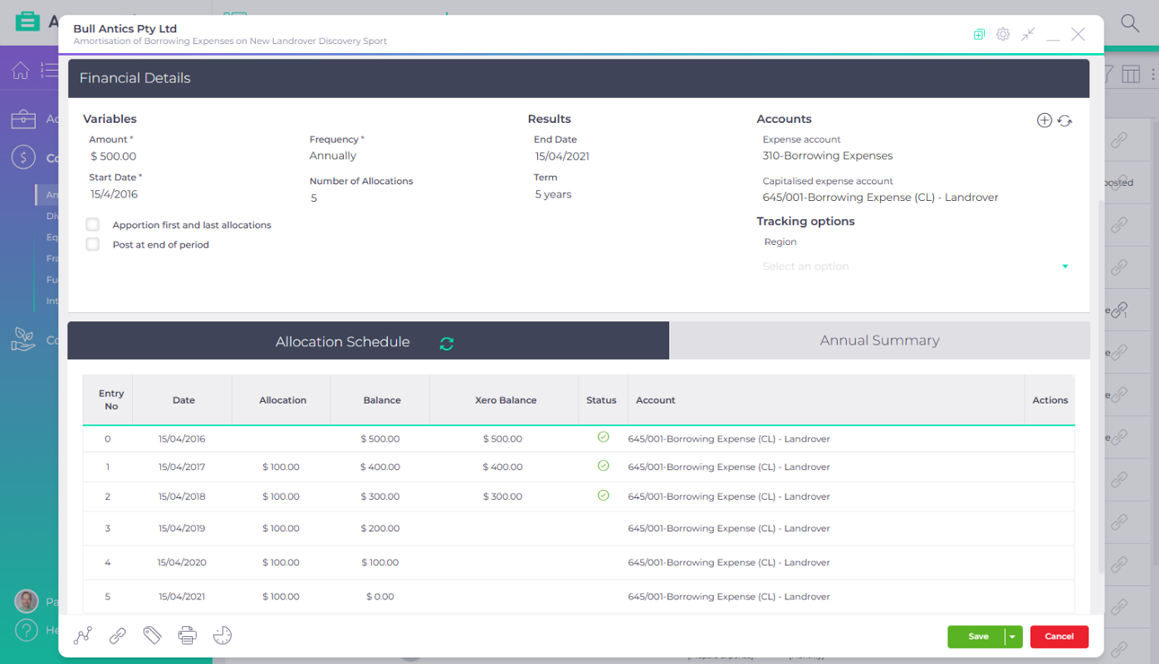
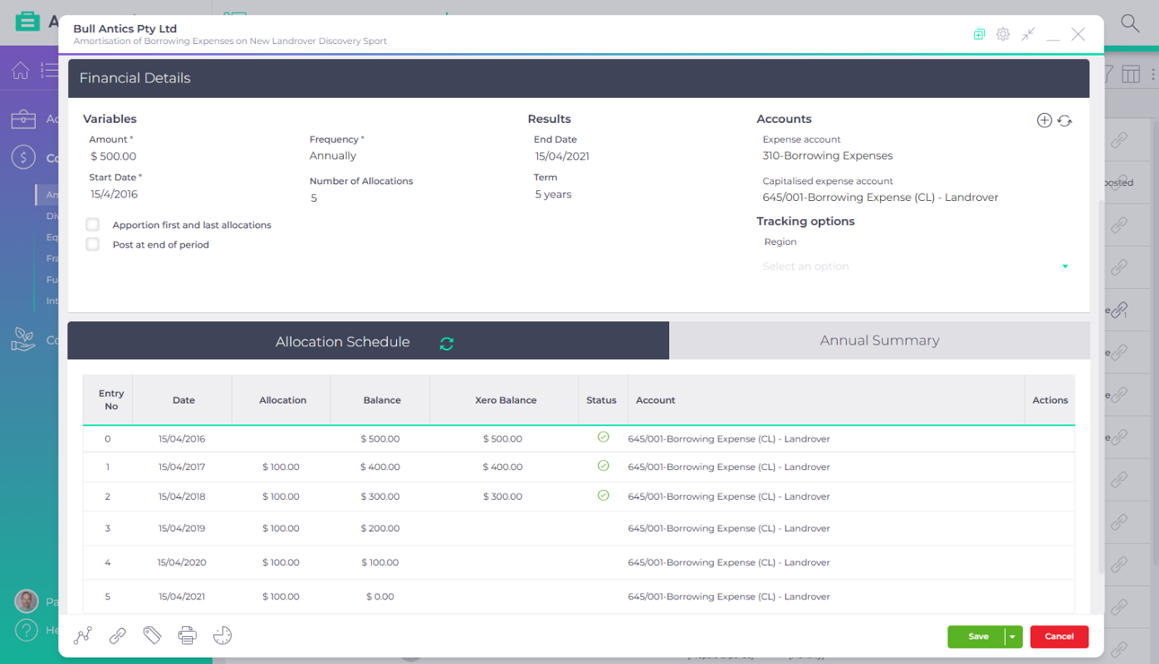
Amortisation scheduler
Spread any payment across the relevant period it covers
Keep every borrowing expense, prepayment and amount received in advance in one place instead of a spreadsheet each. AccountKit spreads each one over the periods it covers, posts the journals and checks every balance against the ledger.
Included in the base subscription
| Client | Description | Amount | Allocation | Balance | Status | Documents |
|---|---|---|---|---|---|---|
| Bull Antics Pty Ltd | Business insurance 2026/27Prepaid Expense | $ 14,280.00[Prepaid Expense] | $ 1,190.00[Monthly] | $ 10,710.00 | In balance | |
| Bull Antics Pty Ltd | Game licence fees received in advancePrepaid Income | $ 36,000.00[Prepaid Income] | $ 9,000.00[Quarterly] | $ 9,000.00 | In balance | 2 |
| Bull Nominees Pty Ltd | Company set-up costsBlackhole Expenditure | $ 5,200.00[Blackhole Expenditure] | $ 1,040.00[Annually] | $ 4,160.00 | In balance | |
| Bull Property Trust | Borrowing expenses on the investment property loanBorrowing Expense | $ 4,850.00[Borrowing Expense] | $ 970.00[Annually] | $ 2,301.42 | In balance | 2 |
| Bull Property Trust | Borrowing expenses on the 2019 refinanceBorrowing Expense | $ 3,600.00[Borrowing Expense] | $ 720.00[Annually] | $ 0.00 | Completed | |
| Bullish Pty Ltd | Software subscriptions paid annuallyPrepaid Expense | $ 8,400.00[Prepaid Expense] | $ 700.00[Monthly] | $ 6,300.00 | Out of balance | |
| Crazy Bull Family Trust | Strata levies paid in advancePrepaid Expense | $ 2,760.00[Prepaid Expense] | $ 690.00[Quarterly] | $ 2,070.00 | Not synced | |
| Schurr Pty Ltd | Workers compensation premium 2026/27Prepaid Expense | $ 9,840.00[Prepaid Expense] | $ 820.00[Monthly] | $ 7,380.00 | In balance | |
| Schurr Pty Ltd | Trade show stand fees paid in advancePrepaid Expense | $ 4,400.00[Prepaid Expense] | $ 1,100.00[Quarterly] | $ 3,300.00 | Not synced | |
| Schurr Family Trust | Borrowing expenses on the share portfolio loanBorrowing Expense | $ 2,900.00[Borrowing Expense] | $ 580.00[Annually] | $ 0.00 | Completed[Written off] |
Illustrative view. Sample client groups and sample figures.
What goes wrong today
A workbook for every prepayment
Insurance, borrowing expenses and income in advance each get their own spreadsheet, and the journals are keyed into your accounting software by hand.
The current portion is recalculated each time
Splitting the balance between current and non-current means working out the next twelve months again whenever the accounts are prepared.
Nobody notices the ledger has moved
When a journal is edited or deleted in your accounting software, the spreadsheet doesn’t know, and the difference turns up at review.
One schedule, start to finish
From the set-up to the year-end journal
These are Bull Property Trust’s borrowing expenses on an investment property loan, spread over five years. The figures are made up, but each step works the way the tool does.
Set up the schedule once
Enter the amount, the start date and how often to allocate it, and pick the type. The type decides whether the journal runs to income or expense, and you can add your own, such as blackhole expenditure. Apportion the first and last allocations by day, and split the balance into current and non-current if you like.
Every allocation checked against your accounting software
Each allocation shows the balance, split into current and non-current, beside the balance in your accounting software. Post from the row: this journal, everything to an allocation date, or the whole schedule.
The split between current and non-current is done for you
Each journal allocates the period to the expense account, and moves the next twelve months from non-current into current, so the balance sheet is right without a year-end reclass.
Send the schedule with the file
Export any schedule as a PDF or Excel work paper, with the summary by financial year and every allocation, straight to your computer or the client’s folder in your DMS.
- Set up the schedule once
- Every allocation checked against your accounting software
- The split between current and non-current is done for you
- Send the schedule with the file
Set up the schedule once
Enter the amount, the start date and how often to allocate it, and pick the type. The type decides whether the journal runs to income or expense, and you can add your own, such as blackhole expenditure. Apportion the first and last allocations by day, and split the balance into current and non-current if you like.
Variables
- Amount
- $ 4,850.00
- Frequency
- Annually
- Start Date
- 14/11/2023
- Number of Allocations
- 5
Apportion first and last allocations(6 allocations spread over 5 periods)
Post at end of period
Results
- End Date
- 30/06/2029
- Term
- 5 years and 7 months
Accounts
- Expense account
- 310 Borrowing Expenses
- Capitalised expense account (current)
- 645 Borrowing costs (CA)
- Capitalised expense account (non-current)
- 745 Borrowing costs (NCA)
Tracking options
- Property
- Select an option
Illustrative AccountKit Amortisation Scheduler. Sample client group and sample figures, not a live ledger.
Every allocation checked against your accounting software
Each allocation shows the balance, split into current and non-current, beside the balance in your accounting software. Post from the row: this journal, everything to an allocation date, or the whole schedule.
| Entry No | Date | Allocation | Balance | Ledger Balance | Status | Account | Actions |
|---|---|---|---|---|---|---|---|
| 0 | 14/11/2023 | $ 608.58$ 4,241.42 | $ 608.58$ 4,241.42 | 645 Borrowing costs (CA)745 Borrowing costs (NCA) | |||
| 1 | 30/06/2024 | $ 608.58 | $ 970.00$ 3,271.42 | $ 970.00$ 3,271.42 | 645 Borrowing costs (CA)745 Borrowing costs (NCA) | ||
| 2 | 30/06/2025 | $ 970.00 | $ 970.00$ 2,301.42 | $ 970.00$ 2,301.42 | 645 Borrowing costs (CA)745 Borrowing costs (NCA) | ||
| 3 | 30/06/2026 | $ 970.00 | $ 970.00$ 1,331.42 | $ 970.00$ 2,301.42 | 645 Borrowing costs (CA)745 Borrowing costs (NCA) | ||
| 4 | 30/06/2027 | $ 970.00 | $ 970.00$ 361.42 | 645 Borrowing costs (CA)745 Borrowing costs (NCA) | |||
| 5 | 30/06/2028 | $ 970.00 | $ 361.42$ 0.00 | 645 Borrowing costs (CA)745 Borrowing costs (NCA) | |||
| 6 | 30/06/2029 | $ 361.42 | $ 0.00$ 0.00 | 645 Borrowing costs (CA)745 Borrowing costs (NCA) |
Illustrative AccountKit Amortisation Scheduler. Sample client group and sample figures, not a live ledger.
The split between current and non-current is done for you
Each journal allocates the period to the expense account, and moves the next twelve months from non-current into current, so the balance sheet is right without a year-end reclass.
| Entry No | Date | Allocation | Balance | Ledger Balance | Status | Account | Actions |
|---|---|---|---|---|---|---|---|
| 0 | 14/11/2023 | $ 608.58$ 4,241.42 | $ 608.58$ 4,241.42 | 645 Borrowing costs (CA)745 Borrowing costs (NCA) | |||
| 1 | 30/06/2024 | $ 608.58 | $ 970.00$ 3,271.42 | $ 970.00$ 3,271.42 | 645 Borrowing costs (CA)745 Borrowing costs (NCA) | ||
| 2 | 30/06/2025 | $ 970.00 | $ 970.00$ 2,301.42 | $ 970.00$ 2,301.42 | 645 Borrowing costs (CA)745 Borrowing costs (NCA) | ||
| 3 | 30/06/2026 | $ 970.00 | $ 970.00$ 1,331.42 | $ 970.00$ 1,331.42 | 645 Borrowing costs (CA)745 Borrowing costs (NCA) | ||
| 4 | 30/06/2027 | $ 970.00 | $ 970.00$ 361.42 | 645 Borrowing costs (CA)745 Borrowing costs (NCA) | |||
| 5 | 30/06/2028 | $ 970.00 | $ 361.42$ 0.00 | 645 Borrowing costs (CA)745 Borrowing costs (NCA) | |||
| 6 | 30/06/2029 | $ 361.42 | $ 0.00$ 0.00 | 645 Borrowing costs (CA)745 Borrowing costs (NCA) |
Entry 3: $ 970.00 to expense, and the next twelve months’ $ 970.00 from non-current to current.
| Account | Narration | Tax | Debit | Credit |
|---|---|---|---|---|
| 310 Borrowing Expenses | Allocation 3 of 6 | BAS Excluded | $ 970.00 | |
| 645 Borrowing costs (CA) | Allocation 3 of 6 | BAS Excluded | $ 970.00 | |
| 645 Borrowing costs (CA) | Next 12 months to current | BAS Excluded | $ 970.00 | |
| 745 Borrowing costs (NCA) | Next 12 months to current | BAS Excluded | $ 970.00 | |
| $ 1,940.00 | $ 1,940.00 | |||
Illustrative AccountKit Amortisation Scheduler. Sample client group and sample figures, not a live ledger.
Send the schedule with the file
Export any schedule as a PDF or Excel work paper, with the summary by financial year and every allocation, straight to your computer or the client’s folder in your DMS.
Details
- Amount
- $ 4,850.00
- Frequency
- Annually
- Start date
- 14/11/2023
- Number of periods
- 5
- End date
- 30/06/2029
- Term
- 5 years and 7 months
- Apportion allocations
- Yes
Summary
| Financial Year | Allocations | Balance | Account |
|---|---|---|---|
| 2023/2024 | $ 608.58 | $ 4,241.42 | 310 Borrowing Expenses |
| 2024/2025 | $ 970.00 | $ 3,271.42 | 310 Borrowing Expenses |
| 2025/2026 | $ 970.00 | $ 2,301.42 | 310 Borrowing Expenses |
| 2026/2027 | $ 970.00 | $ 1,331.42 | 310 Borrowing Expenses |
| 2027/2028 | $ 970.00 | $ 361.42 | 310 Borrowing Expenses |
| 2028/2029 | $ 361.42 | $ 0.00 | 310 Borrowing Expenses |
| Total | $ 4,850.00 |
Illustrative AccountKit Amortisation Scheduler. Sample client group and sample figures, not a live ledger.
Who it’s for
Built for any amount that’s spread over time
Practices whose clients prepay insurance, pay borrowing expenses on a loan or receive income in advance, and firms that prepare monthly management reports. The schedule type switches between income and expense, and the journals run the right way for each.
How often it comes round
Every period the schedule covers, monthly, quarterly, six-monthly or annually, until the balance is fully allocated or written off.
- When the invoice arrives
- Build the schedule from the amount and the dates it covers.
- Each period
- The journal posts, by hand or overnight, and the balance is checked against your accounting software.
- At review
- Anything out of balance shows in the list, so it’s fixed while it’s fresh.
- If it ends early
- Write off the remaining balance as a one-off event.
Connected to the rest of the file
Schedules that sit with everything else on the client
Journals post straight into the client’s accounting software, and a schedule can stand alone if the client isn’t connected. Link the loan documents or the invoice from your document management, so the support sits with the schedule.
The screens above use sample client groups, made-up figures and a sample chart of accounts. They aren’t a live AccountKit session or advice on how to treat a particular expense.
Questions
What practices ask about amortisation scheduler
What can the amortisation scheduler spread?
Anything you want to spread over a defined period, such as borrowing expenses, prepaid income or a year’s insurance paid as a lump sum. You can add your own schedule types too.
Does it split the balance between current and non-current?
It can. Choose a current and a non-current account, and each journal moves the next twelve months into current as the schedule runs.
Does the amortisation scheduler work without connected accounting software?
Yes. You can build a schedule for a client who isn’t connected and export it to prepare the journals in their ledger software yourself.
Can I pick up a schedule that’s already part way through?
Yes. For a client connected to your accounting software, choose Existing Schedule and enter the date it was last reconciled. AccountKit posts journals from that date.
What if a loan with borrowing expenses is paid out early?
Use the early write-off event. AccountKit journals out the remaining balance, updates the schedule as at the write-off date and posts no further journals.
The heart of your firm
Build your next prepayment schedule in AccountKit
Start a free 14-day trial and set up a schedule for one client’s insurance or borrowing costs, or book a demo to see the journals post.