Extra loan repayments
Show a client what extra repayments save
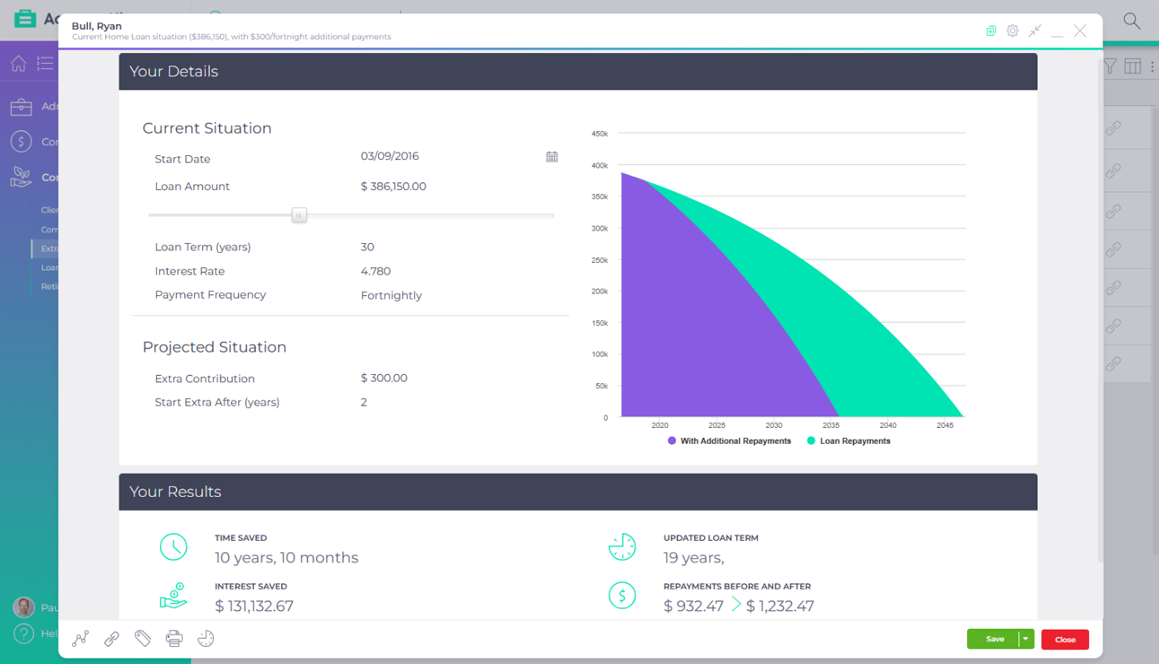
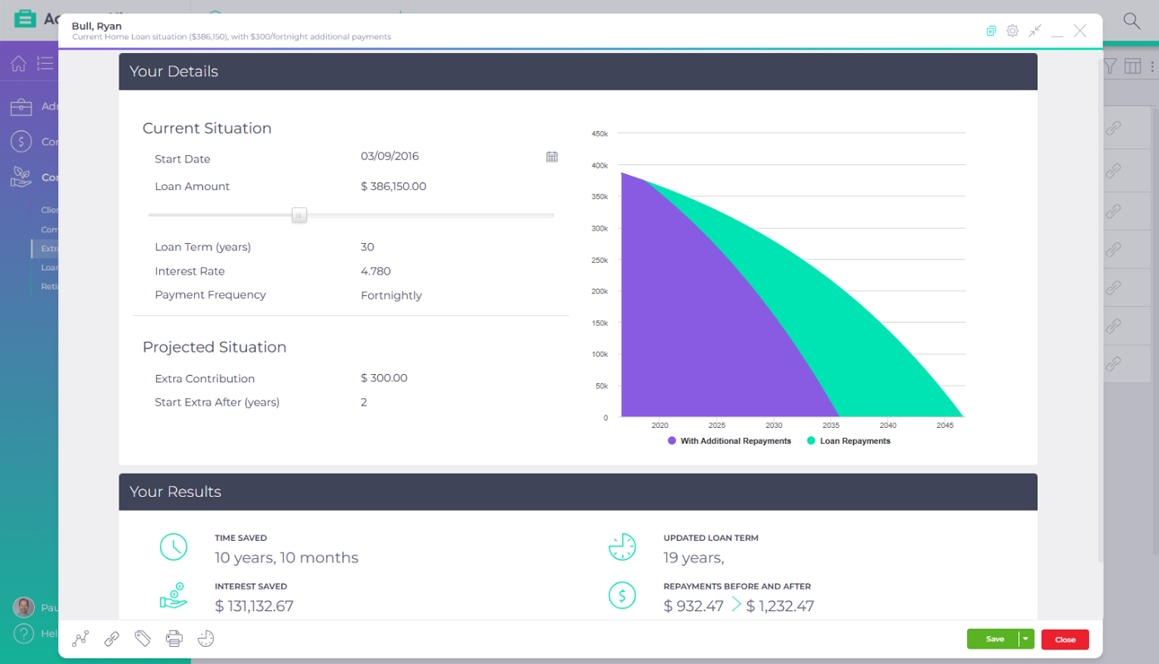
Enter the loan, the extra amount and when it starts, and the extra repayments calculator shows the time saved, the interest saved and the new loan term, graphed in your practice colours for a client meeting.
Included in the base subscription

Published AccountKit product screenshot; the interface may have changed since capture.
What goes wrong today
A small extra repayment sounds pointless
Clients can’t picture years coming off a loan from a modest increase to each repayment.
The saving is hard to show live
Working out a new loan term during a meeting means a spreadsheet the client can’t follow.
Inside the tool
Compare the loan with and without the extra
Step through a sample comparison. The figures are illustrative, not a lending or savings projection.
Selected scenario 01
Original path
Enter the start date, loan amount, term, interest rate and payment frequency. Estimates are enough to make the point, and exact figures give a more precise result.
Sample interface and values. This illustration does not calculate a loan, super balance or retirement outcome, and is not financial advice.
A baseline the client recognises
Selected scenario 02
Extra amount
Add the extra contribution above the current repayment and choose when it starts.
Sample interface and values. This illustration does not calculate a loan, super balance or retirement outcome, and is not financial advice.
See the repayment before and after
Selected scenario 03
Client chart
The results show the time saved, the interest saved and the updated loan term, with a graph to talk the client through.
Sample interface and values. This illustration does not calculate a loan, super balance or retirement outcome, and is not financial advice.
The trade-off is clear to the client
Interactive demonstration with sample data, based on the AccountKit interface.
Who it’s for
For the conversation after the loan is set
Accountants and advisers talking to clients about paying down a home loan or other debt sooner. AccountKit suggests using the loan calculator first to work out what a client can borrow, then this one to show what paying more saves.
How often it comes round
Whenever a client has spare cash flow and a loan to pay down.
- Once the loan is set
- Show the effect of paying more each period.
- At a review
- Try a later start or a different extra amount.
Questions
What practices ask about the extra loan repayments
What does the extra repayments calculator show?
The time saved, the interest saved, the updated loan term and the repayment before and after the extra starts.
Do I need the exact loan details?
No. Estimates of the rate and the loan amount are enough to show the effect. Exact figures give a more precise result.
Can the extra repayments start later in the loan?
Yes. Set when the extra contributions start, and the comparison runs from that point.
Make it your practice
Show your next client what paying more saves
Start a free 14-day trial and run a client’s home loan through it, or book a demo to see the consulting tools with the team.